Navigation Guide
This document contains:
- The Sign Up Process
- Navigating the Tool
- Course Navigation
- Course Content
- Completing Quizzes
- Feedback
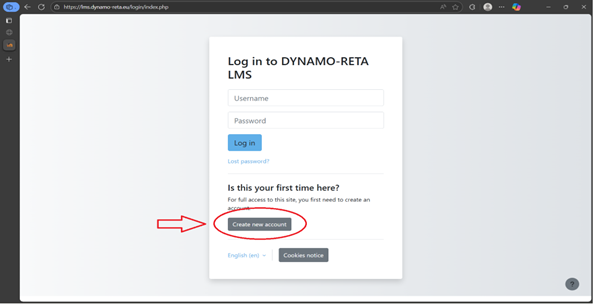
To begin your training, you’ll first need to sign up.
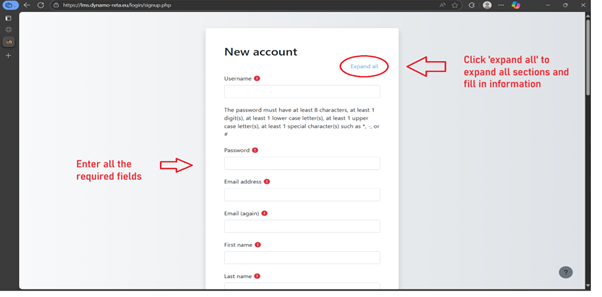
Required information:
- Username
- Password (must include: 8+ characters, 1 digit, 1 uppercase, 1
- lowercase, 1 special character such as *, -, or #)
- Email address (entered twice to confirm)
- First and Last Name
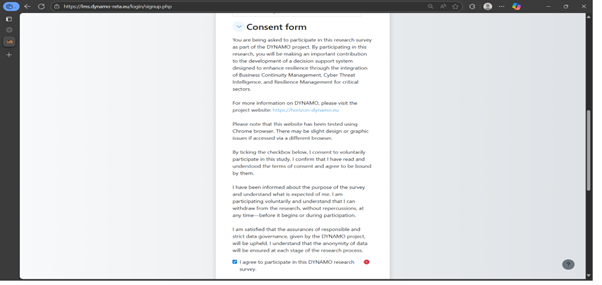
In the sign up form, you must read and agree to the consent form.
About the Consent Form:
You are participating in the DYNAMO research project.
The project aims to improve resilience by integrating Business Continuity Management, Cyber Threat Intelligence, and Resilience Management.
Visit https://horizon-dynamo.eu for more information.
To continue:
- Read the full consent text.
- Tick the checkbox to confirm understanding and voluntary participation.
- This is a required step to access the training.
You will also be asked to complete a brief questionnaire covering:
- Gender, age, and location
- Education and professional background
- BCM training and certifications
- Familiarity with BCM principles
- Learning objectives and challenges (optional)
Why it matters:
Your responses will help us assess your experience and, if requested, recommend the most suitable training level for you and support ongoing research improvements.
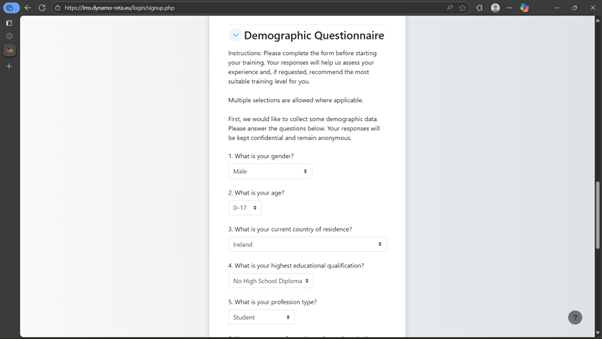
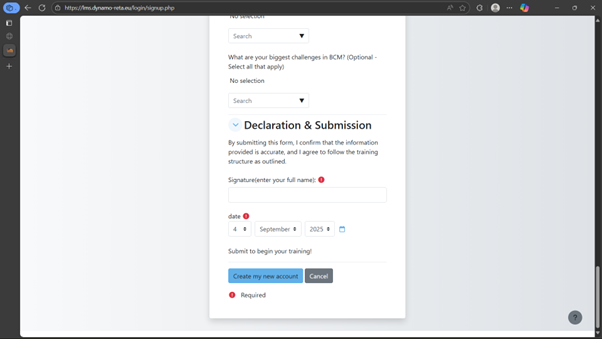
Before submitting the form:
- Confirm the accuracy of your responses.
- Sign the declaration by typing your full name.
- Enter the current date.
- Click “Submit” to officially begin your BCM Awareness training.
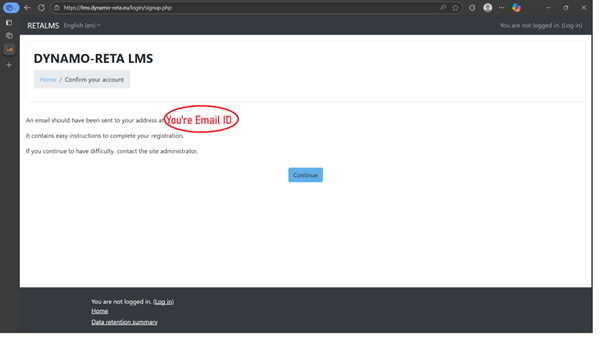
Once you have submitted, a verification email like this will be sent to activate your account.
Check your email inbox for a verification message.
Click the activation link in the email to confirm your account.
If the email doesn’t appear in your inbox, remember to check your spam or junk folder.
You will be redirected to log in and now you can access all the courses.
Once Completed proceed by selecting the course you want to participate in the homepage
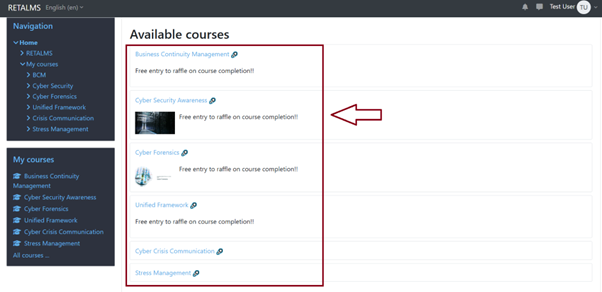
A breakdown for each available RETALMS course, showing the number of levels/modules and the number of exercises/activities per level:
Business Continuity Management (BCM)
Levels: 3
Level 1 – Introduction to BCM: Contains 5 quizzes, plus multiple lesson activities (e.g., “Quick Knowledge Check” types, concept reinforcement MCQs, scenario-based activities).
Level 2 – Intermediate (Scenario-Based Training): Includes “Practical Scenarios” activities and assessments.
Level 3 – Advanced BCM (Strategic Decision Making): Features at least 1 compact strategy development exercise, plus scenario lessons and feedback tasks.
Cyber Security Awareness
Levels: 6 sections (structured as chapters/modules)
Each section has several lesson activities
Quizzes include: “Test Your Knowledge,” “Match the Concept,” “Best Practices Challenge,” “Choose the Correct Action,” and several scenario-based multiple choice and application quizzes.
Cyber Forensics
Levels: 3
Level 1: Intro/Foundation—lesson activities.
Level 2: Practical Investigations—contains at least 8 quizzes (“Quick Knowledge Check” series, case studies, scenario quizzes).
Level 3: Strategic Response—at least 2 major scenario-based assessments plus other knowledge checks.
BCM-CTI Resilience Framework
Levels: 2
Level 1: Contains approximately 7 quizzes dispersed throughout modules (“Question on Alignment,” scenario-based MCQs).
Level 2: Contains use case quizzes for healthcare, energy, and maritime sectors (approx. 8 major case quizzes).
Cyber Crisis Communication
Levels: 2 modules
Module 1: Includes 1 “Knowledge Check” quiz.
Module 2: Includes 1 “Knowledge Check” quiz.
Stress Management
Levels: 8 modules (Module 0 through Module 7)
Each module has at least 1 quiz (e.g., “Quiz Module 1,” “Quiz Module 2 Mindfulness”), plus key takeaways and conclusion exercises.
Summary Table
|
Course Name |
Number of Levels/Modules |
Number of Exercises (per Level/Module) |
|
Business Continuity Mgmt |
3 |
Level 1: 5+, Level 2: 1+, Level 3: 2+ |
|
Cyber Security Awareness |
6 |
Each section: 1+ quizzes, many lesson activities |
|
Cyber Forensics |
3 |
Level 2: 8+, Level 3: 2+, Level 1: lessons |
|
BCM-CTI Resilience Framework |
2 |
Level 1: 7+, Level 2: 8+ (case quizzes) |
|
Cyber Crisis Communication |
2 |
Module 1: 1, Module 2: 1 |
|
Stress Management |
8 |
Each module: 1+ quiz/exercise |
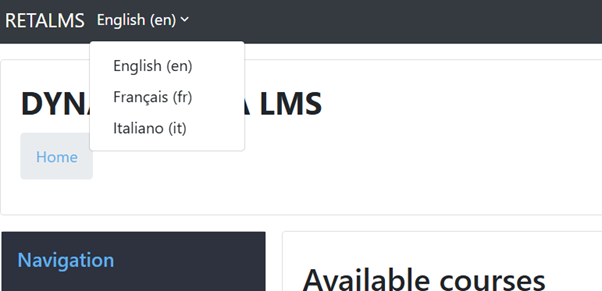
The courses supports multiple languages for accessibility and convenience.
To switch the language:
- Locate the language selector in the top-left corner of the screen.
- Click the dropdown menu.
- Select French or Italian from the list.
The interface and course content (where available) will update to your selected language.
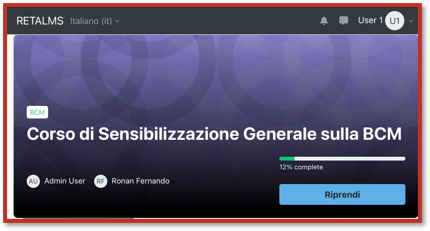
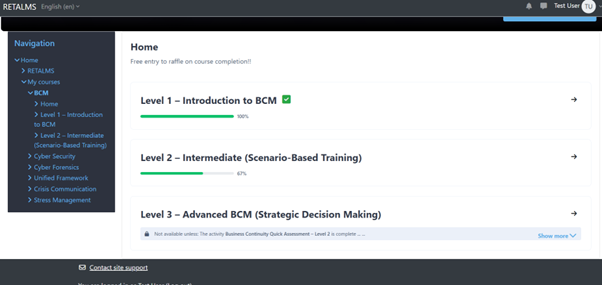
Some courses would have levels to them. You would have to complete all the content and quizzes in order to complete the course.
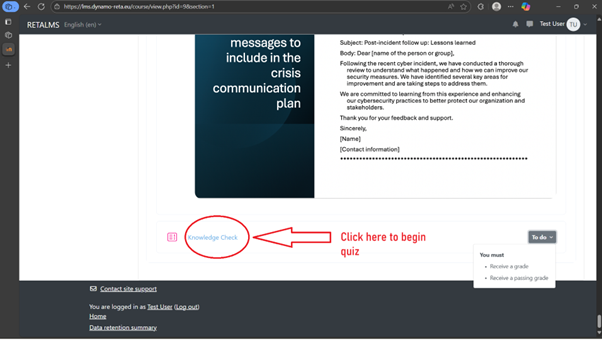
Quizzes & Scenario based Assessments
To test your understanding and reinforce key concepts.
Progression Requirement:
- You must attempt each quiz to proceed to the next activity or slide.
- Skipping is not allowed. Activities remain locked until an attempt is made on a quiz.
Multiple Attempts:
- Quizzes may allow more than one attempt.
- If you don’t pass on the first try, review the content and try again.
- The system will only unlock the next activity once you attempt a quiz, a passing score does not need to be achieved.
- Re-attempting a quiz is purely for informative purposes.
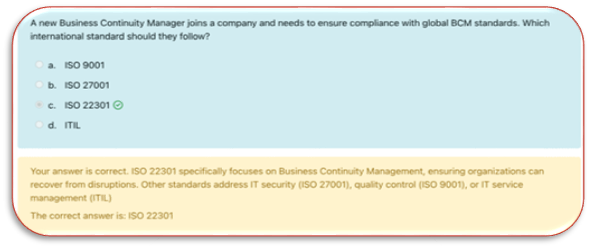
Scenario based Assessments
What to Expect:
- Multiple Choice Questions
- Scenario-Based Questions based on previous slides and cases
- Timed or untimed quizzes (Some tasks have a time limit)
Upon Activity Completion Please Click the navigation bar to the left to come back to the course menu to proceed further in the course
Progress Tracking
There are two progress bars
- Indicating overall course progression

- Indicating Course Activity Progression (Note this progress bar only calculates progress made in Activities such as Quizzes, Tests and Assessments
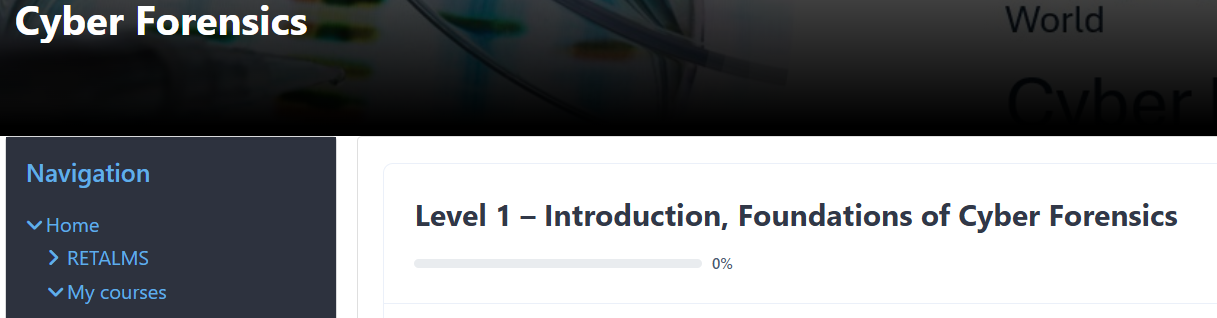
Your progress will always be saved and your account will have the data intact.
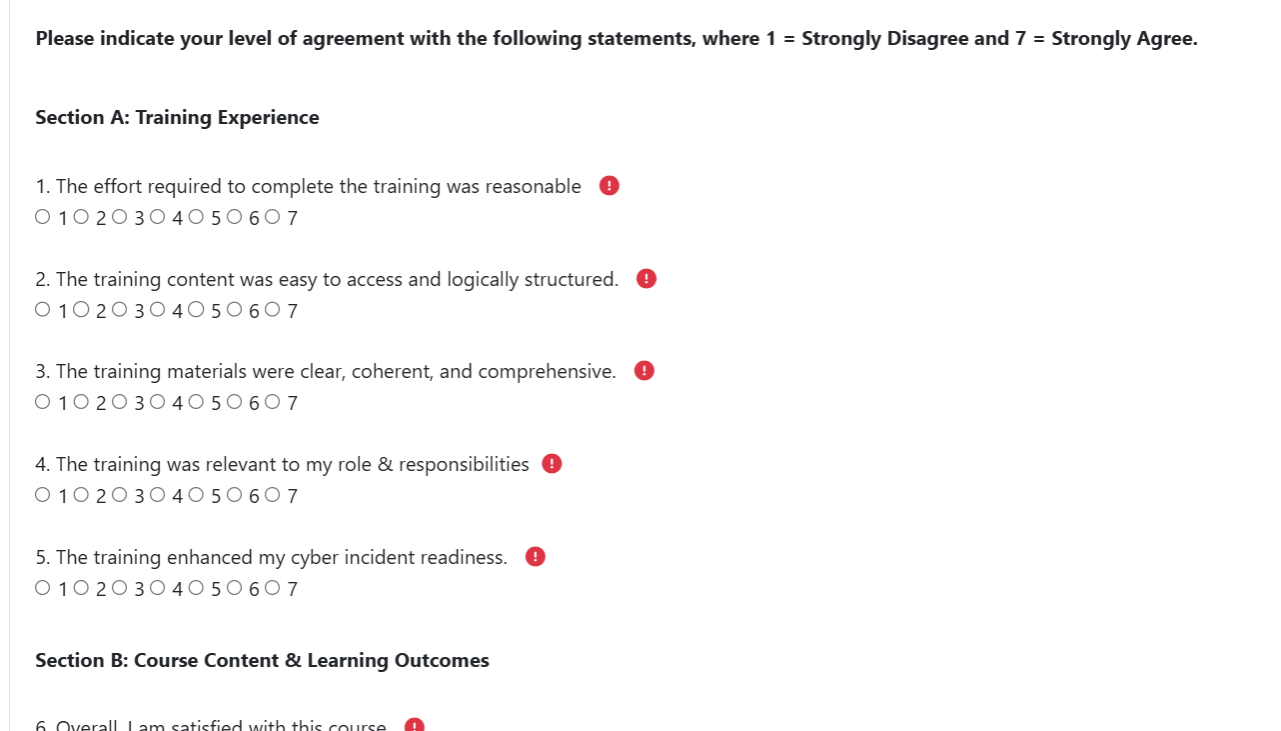
At the end of the training, you’ll complete a required feedback form to help improve the course and tool.
Your name will be recorded with your responses.
Questions generally use a 1–7 scale (1 = Strongly Disagree, 7 = Strongly Agree).
Covers:
- Training quality (clarity, relevance, effort required)
- Tool usability (navigation, design, ease of use)
- User satisfaction (engagement, motivation, effectiveness)
- Ends with a required open-text field for suggestions or comments.
Why it matters: Your feedback helps refine the course, enhance usability, and improve the overall training experience for future users.
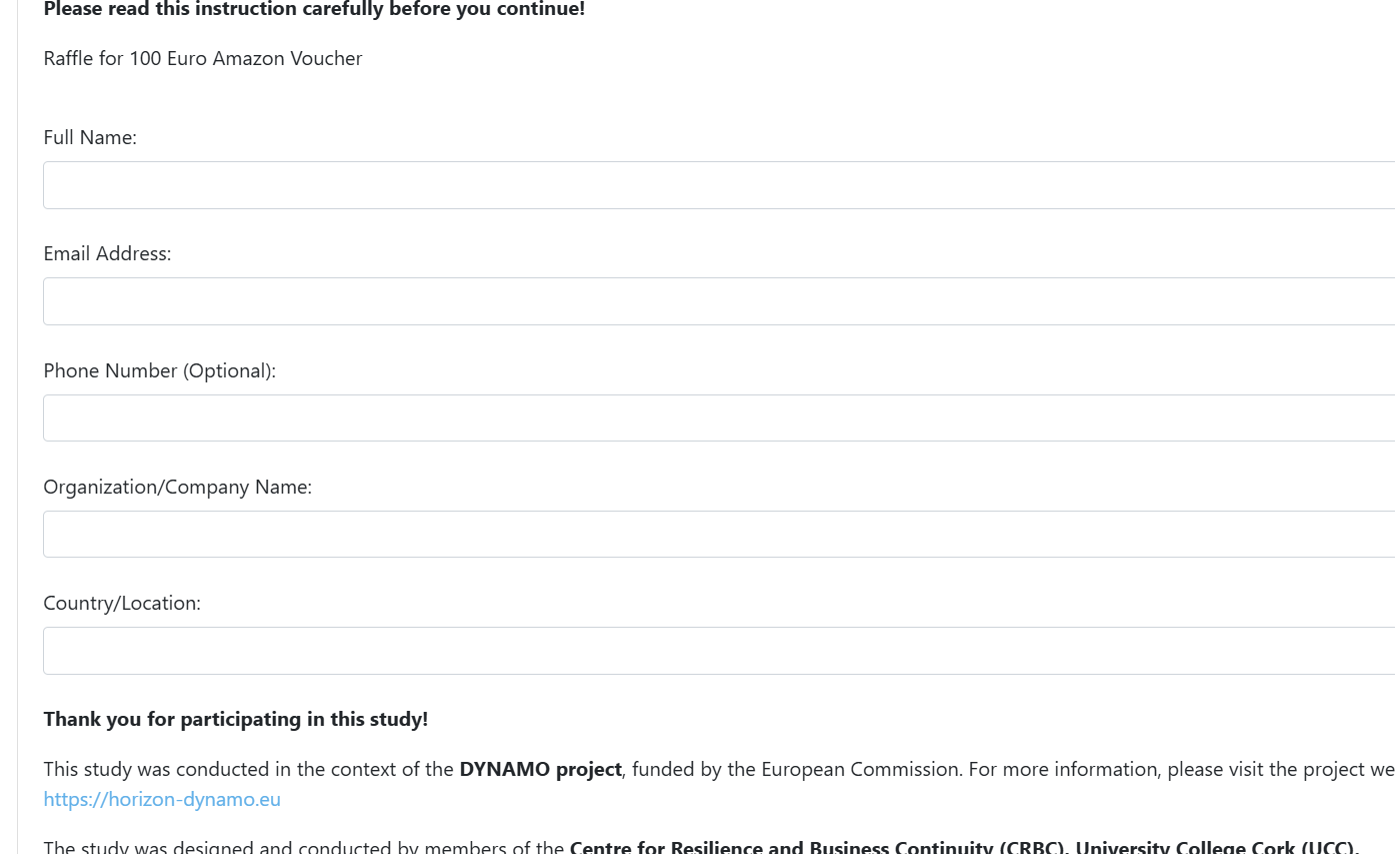
Some courses contain a Raffle at the end which needs to be filled up in order to get a 100 Euro Amazon Voucher.